Running a restaurant is challenging. Managing orders shouldn’t be.
Imagine a busy restaurant during the dinner rush. Customers are waiting, waiters are taking orders, the kitchen is preparing meals, and tables are filling up. One missed order, one misunderstood instruction or one delayed update can disrupt the entire service.
Sound familiar?
👉 Book your FREE demo today and see how it works for your restaurant!
What if your waiters, kitchen staff and restaurant management could stay connected through one simple system?
Introducing Restaurant POS – Your Restaurant Order Management System, designed to make everyday restaurant operations simpler, faster and more organised.
🍽️ One System. Three Roles. Better Coordination.
Restaurant POS brings the essential parts of restaurant order management together.
Whether you’re taking customer orders, preparing food in the kitchen or managing daily restaurant activity, everyone has a dedicated screen to do their job.
Here’s how it works.
🔔 1. Orders That Reach the Kitchen Instantly
No more relying on shouting across the restaurant or manually communicating every order.
When a waiter places a new order, the kitchen receives a live alert with the order details.
The kitchen team can accept the order and update its status when the food is ready. Waiters are then notified, helping everyone stay informed throughout the process.
From the customer’s order to the kitchen’s preparation, everyone stays connected.
👨🍳 2. A Dedicated Kitchen Display
Give your kitchen team a clearer way to manage incoming orders.
The kitchen screen allows staff to:
- Receive new order notifications.
- Accept incoming orders.
- View order details.
- Mark orders as ready.
It’s a straightforward way to keep kitchen orders organised and help staff follow the order workflow.
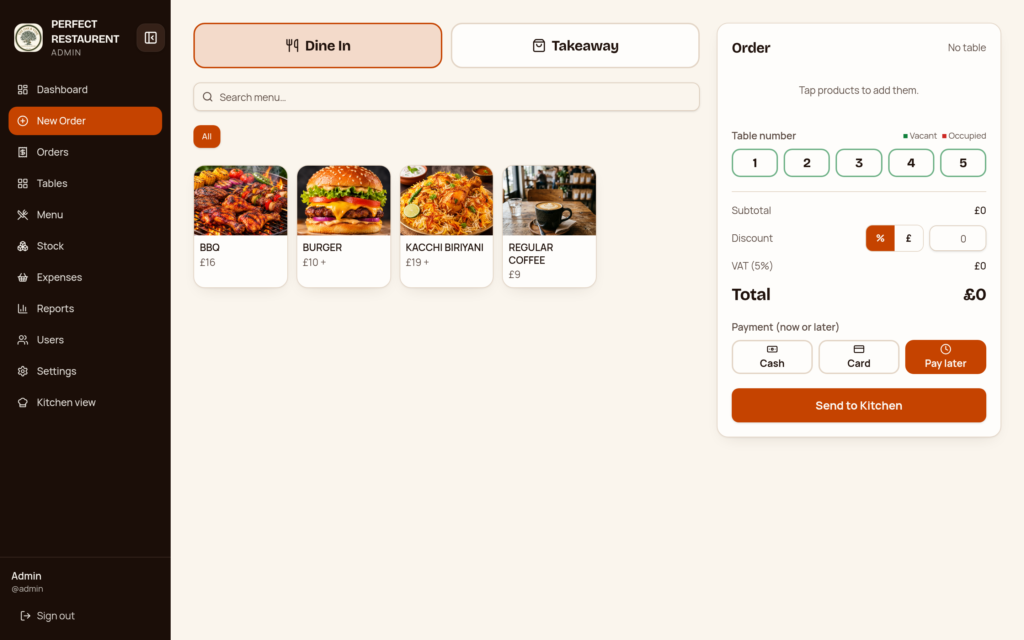
🪑 3. Know Your Table Status at a Glance
Which tables are occupied? Which ones are available?
With live table status, you can see which tables are free and which are busy without having to check each one manually.
A clearer overview helps your team manage dine-in activity more conveniently.
💷 4. Simple Cash and Card Payment Management
Managing payments should be straightforward.
Restaurant POS supports cash and card payment recording, with automatic change calculation for cash payments.
It also supports dine-in and takeaway orders where customers can pay later.
Less manual calculation. A more organised payment process.
🏷️ 5. Discounts and VAT Made Easier
Promotions and tax calculations are part of everyday restaurant operations.
With Restaurant POS, you can:
- Apply percentage-based discounts.
- Apply fixed-amount discounts.
- Calculate VAT automatically.
Everything is designed to make the checkout process easier to manage.
🧾 6. Receipts in Just One Tap
Need to provide a customer with a receipt?
Print receipts with a single tap, making it easier to complete transactions and provide customers with their payment details.
📊 7. Understand Your Restaurant’s Performance
Running a restaurant isn’t just about serving food. It’s also about understanding how the business is performing.
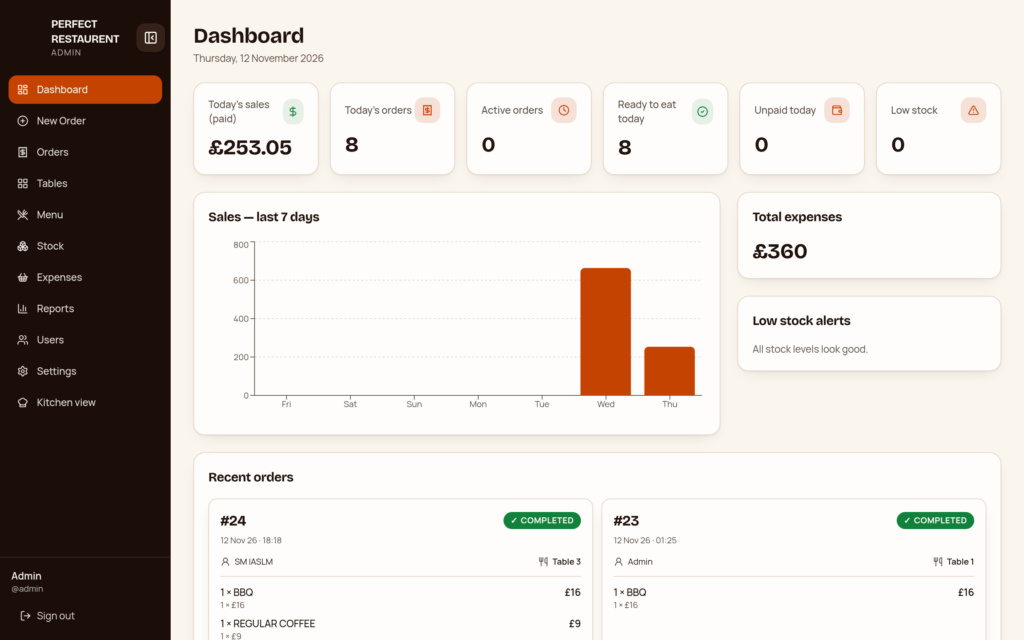
Restaurant POS brings sales, stock and expense information together in one place through its reporting features.
Get a clearer overview of your restaurant’s recorded business activity and make more informed management decisions.
📁 8. Export Reports When You Need Them
Need to review your figures or keep records for a particular period?
Export your reports in PDF or Excel format.
Choose the reporting period that suits you:
- Daily
- Weekly
- Monthly
- Yearly
Your restaurant information can be easier to review, share and keep organised.
👥 Designed Around the Way Restaurants Work
Different team members have different responsibilities. That’s why Restaurant POS includes three dedicated user roles:
- Admin: For restaurant management and administration.
- Waiter: For handling customer orders and waiter operations.
- Kitchen: For receiving and managing food orders.
Each role has its own screen, helping keep responsibilities organised.
📱 Use It on the Devices You Already Have
You don’t need to be tied to one computer.
Restaurant POS works on:
- Mobile phones
- Tablets
- Desktop computers
It’s browser-based, so there’s nothing to install.
Your team can access the system using compatible devices and get on with running the restaurant.
Why Choose Restaurant POS?
Because restaurant order management should be simple, organised and easy to follow.
Restaurant POS brings together:
✓ Waiter-to-kitchen order communication
✓ Live order notifications
✓ Kitchen order management
✓ Table availability status
✓ Cash and card payment recording
✓ Automatic change calculation
✓ Discounts and VAT calculation
✓ One-tap receipt printing
✓ Sales, stock and expense reports
✓ PDF and Excel report exports
✓ Dedicated Admin, Waiter and Kitchen screens
✓ Access through phones, tablets and computers
All in one restaurant order management system.
🚀 Ready to Make Restaurant Order Management Simpler?
Your restaurant deserves a system that helps your team stay connected, keeps orders organised and makes daily operations easier to manage.
Whether you run a small restaurant, a busy dining establishment or a takeaway business, Restaurant POS is designed to support your everyday order management workflow.
Stop making restaurant orders more complicated than they need to be. Bring your waiter, kitchen and management together with Restaurant POS.
